Optimize Firefox for the EeePC

768x421 for browsing The EeePC is a very portable machine, but its size comes with a prize: limited screen estate. With a resolution of 800×480 pixels you should use every square inch wisely.

Here are a few Firefox tips that will help you to have as much screen available as possible for browsing.

Tiny Menu
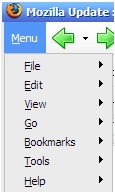
2_.jpg Tiny Menu is an extension that will collapse all of the standard Firefox menu items into a single drop down menu.

After you have installed it, right click into one of the toolbars, choose “Customize..” and then drag all the icons from the “Navigation Toolbar” up into the menu bar.

You now can disable the “Navigation Bar” completely.

Little Fox

1_.jpg Little Fox is a theme for Firefox that replaces all icons with smaller ones. It also removes unnecessary borders and whitespace squeezing out some additional pixels of browser space.

Adblock plus

1_.jpg With so little screen space, there is no sense in wasting it with advertisements. Adblock Plus will help you here. It automatically removes ads from webpages you browse.

For keeping the filter rules up to date I recommend installing the Filterset.G updater as well. Use the built in subscription feature instead.

More Tweaking

For even more screen space you should disable the “Bookmarks Toolbar”. Instead I recommend to open your bookmarks in the sidebar with an additional icon dragged to your menu bar. Right click it, choose “Customize…” again and drag the icon that looks like a book into the menu bar.

Unnecessary buttons and tools can be removed from the toolbars. Good candidates are the “Home” button and the Google search box.

Instead set up a shortcut for Google: visit Google, right click the search field and choose “Add keyword for this search…”. Use the letter g as keyword and save the bookmark. You now can enter g followed by your search terms directly into the URL box. No need for an additional box anymore.


Do you have any additional tips to get more out of the EeePC's small screen? Let me know in the comments.

Tags:
eeepc,
firefox
Similar posts:

 
Posted on Friday April the 11th, 2008 (3 months ago).

Comments

1
Hiding the status bar might be beneficial too. There as a "Autohide Statusbar" plugin somewhere.
2008-04-11 21:48:27
Aaron Griffin
2
Excellent piece. A minor thing, though. ABP's website doesn't recommend installing Filterset.G updater: http://adblockplus.org/en/faq_ … ilterset.g
2008-04-11 21:52:44
Dmitri Popov
3
Yes, I thought about hiding the statusbar, too. But I have a few more extensions installed that are integrated in the statusbar (like twitterfox). But everyone interested in getting some extra pixels check out http://caspar.regis.free.fr/ahs/

Dmitri, thanks for that link! I didn't know about that.
2008-04-11 22:03:37
4
For something like Tiny Menu, I would recommend personal menu(https://addons.mozilla.org/fir … addon/3895).
You can choose what you want to show, and also a pull down bookmark button and a history one.

For using Firefox before 3, autohide(http://www.krickelkrackel.de/autohide/)   is also a nice extension. It can hide all menus when in full screen mode, but show when the mouse is near top or bottom of the screen. ;-)
2008-04-12 06:11:42
5
I just wonder if you could recommend to buy a EeePC for someone who already have a Laptop and a Symbian Handy. I got the offer to get one as payment for my service to a buisness. But I am really not sure if I should take this offer. It's a neat little gadget and I like gadgets!
2008-04-12 10:38:21
6
Julian that depends how you use your laptop and what size it is. When you frequently travel to places where you like to have a real computer with you but don't like to carry too much weight, then go for the Eee.
2008-04-12 16:32:57
7
I've found the vimperator plugin nice. It gets you VI-like navigation, with the additional benefit of not needing any of the toolbars -> more space for the website.
2008-04-13 20:17:23
Mad
8
@ Julian: I bought the Eee just because it is cute and runs linux. But I have grown to like to work with it "on the road".

Whenever I attend meetings, I use it to take notes. It is not as big as a regulat laptop. It fits nicely on the table without shielding you from the people you talk with.

For the first couple of tries, I used OOo for notetalking, but reading about the Eee here on Andi's blog reminded me to install DokuWiki on it - which will make formatting and organizing data much easier.
2008-04-14 19:01:26
9
Following up to my last comment:

I have installed eeexubuntu/lighttpd/dokuwiki on my Eee-PC. Everything works just fine.

But I wanted to desable dokuwiki's caching in order to minimize disk-writes to the flash-disk. I found no configuration-option for this. (The NOCACHE-directive would not do, since I want no caching for any page).

So I went to .../inc/cache.php and changed the line
"$this->cache = getCacheName($key,$ext);" to "$this->cache = '/tmp/dokuwiki.cache';". (/tmp is on a ramdisk) and changed the function _useCache() to simply return false;

Looks everything is ok now.

Only question remainig: Is there (shouldn't there be) a better/simpler/cleaner way to do so?
2008-04-15 11:12:39
10
Stefan, this discussion would be better put to the DokuWiki forum or mailing list. Switching the cache dir to /tmp is just a matter of setting $conf['cachedir'] accordingly.

BTW. I wouldn't worry that much about the lifetime of the flash drive. We're talking about a 300€ laptop here - the flash drive would last several years even with heavy use. If the Eee holds for 2 years it was more than worth its money and I have no problem to buy a new one then.
2008-04-15 11:20:48
CAPTCHA

No HTML allowed. URLs will be linked with nofollow attribute. Whitespace is preserved.


Blog

Older Weblog articles are available in the Archive, subscribe to the
Full Content RSS Feed
to stay tuned. (learn more)

Subscribe to the Feed

Recent Blog Entries


This is the personal web site of Andreas Gohr - human being, blogger and web geek from Berlin, Germany.

This page was last updated at 2008/04/11 22:04.
Imprint/Impressum

Tagged at del.icio.us:

Bookmarks: 6

View blog reactions

Elsewhere:


Recent readers: